

Seriously… This – Again?
Over the past two weeks, while using LinkedIn in my job search, I have seen at least three articles repeat the same warning about URLs that use Cyrillic characters to impersonate familiar domains.
Look, the technique has been around forever. The articles I read emphasized the danger <smh> but offered little (NO) practical guidance for individuals, small teams, or larger enterprises. I mean – who doesn’t love a good click-bait and meme LinkedIn post? …And every few lunar cycles, the gravitational pull must somehow make cybersecurity bloggers feel savvy, but go a bit insane and make it seem like this is the biggest threat you haven’t solved.
Let me save you the time – it’s not. You know you have much bigger issues to deal with.
I always believed that people who love to say the building is on fire are looking for the easy clicks instead of actually doing the work; they seem to know how to pull the alarm, get everyone in a panic, but never offer to use (or train how to use) the extinguisher in their hands.
Here is my summary for those who need the elevator pitch:
TL;DR
- A real threat, but not the leading one. Don’t lose sleep. Cyrillic look-alike domains are a small subset of phishing, which accounted for 16% of breaches in the 2026 Verizon DBIR. Exploited vulnerabilities (31%) and stolen credentials remain higher priorities.
- The connection to BEC remains unquantified. I found no published data attributing a meaningful share of the $3.05 billion in 2025 BEC losses to Cyrillic domains. Phone-based scams, meanwhile, doubled in early 2026.
- Browser protection is useful, but incomplete. Researchers bypassed Chrome’s protections again in October 2026, and Gmail displays look-alike senders as readable text.
- Practical safeguards are accessible. Use passkeys or phishing-resistant MFA, avoid signing in through links, enable filtered DNS, and verify banking changes by phone.
- Respond quickly to domain impersonation. In the past, my team had a look-alike domain taken down 45 minutes after reporting it to the registrar, with no financial loss.
- This article covers: practical plans for families, small businesses, and enterprises, followed by a simple response playbook for domain impersonation.
What I set out to answer
I wanted to understand why this issue is attracting renewed attention, how significant the risk is, and what evidence connects Cyrillic look-alike domains to business email compromise (BEC) or other cyber incidents.
What follows is what I found, and the steps I would prioritize.
The “a” that isn’t an “a”
Compare these two addresses: apple.com and аррӏе.com. On many screens, they look identical. The second uses Cyrillic letters rather than Latin ones and represents a different domain.
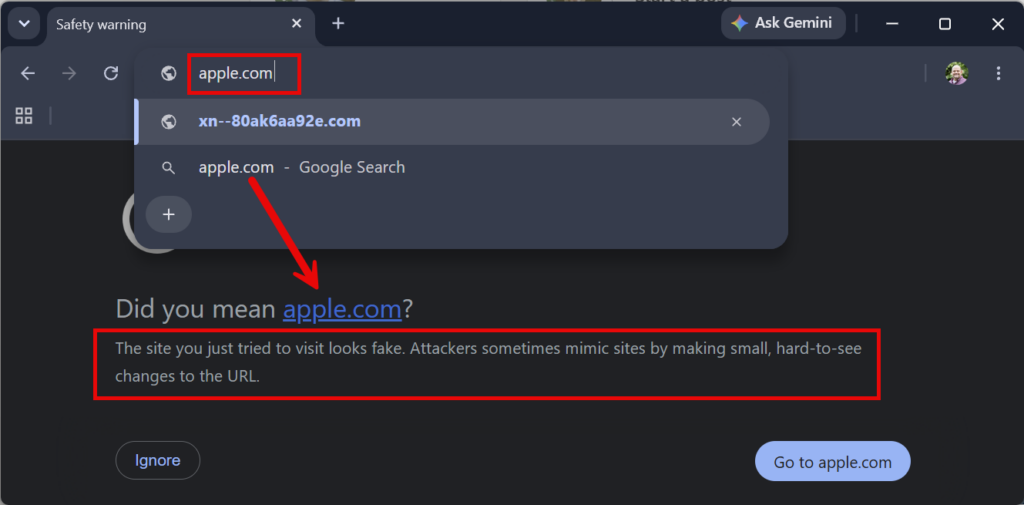
This technique is known as an IDN homograph attack. Internationalized Domain Names (IDNs) allow people to register domains in their own alphabets. Several Cyrillic letters (а, с, е, о, р, х, у), however, closely resemble Latin characters. An attacker can substitute those characters, register the resulting domain, obtain a valid HTTPS certificate, and host a fraudulent login page <– there’s the “BOOM” that we are constantly warned of.
Browsers and DNS process the domain through an encoded representation called Punycode, identified by the xn-- prefix. To the user, the page may appear to carry a familiar brand name, a secure connection, and a legitimate login form.
Understanding the technique is only the starting point. The more useful questions are how often it is used and which safeguards reduce the risk.
How significant is the threat?
This is a real but relatively narrow threat. My estimate is that it accounts for well under 1% of breaches. Even so, the available safeguards are inexpensive enough to make it worth addressing – but not something I’d put in my top 25 of actionable remediations that would reduce the risk of financial loss.
For context, the 2026 Verizon DBIR found that exploiting vulnerabilities was the top way attackers got in, at 31% of breaches. Phishing was the entry point for 16%, stolen credentials for 13%, and pretexting (voice and chat scams) for another 6%.
Homograph domains are one technique within that 16% phishing category. Most phishing relies on other methods: compromised legitimate sites, free hosting, URL shorteners, QR codes, or a simple misspelling such as “cornpany.com.” (yes I went with a “Thanksgiving” Theme).
The published research provides several measures of domain activity:
- Farsight Security (2018): 35,989 look-alike domains imitating 466 brands. Over 91% led to a live website, and mixing Latin and Cyrillic letters was the most common method.
- DSN 2018 study (2018): Brand owners themselves registered only 6% of the look-alike IDNs for their brands.
- Akamai (2022): Real devices queried 6,670 homograph domains over 32 days.
- Domain Security Report 2026 (2026): Third parties own 88% of the homoglyph domains targeting Forbes Global 2000 brands. That figure covers all look-alike tricks, not just Cyrillic.
- APWG (2025): About 3.8 million phishing sites were seen in the latest full year, for scale.
The research describes thousands of active homograph domains alongside millions of phishing sites. That suggests a relatively small share, although these figures are not directly comparable.
My assessment is: low likelihood, potentially high impact.
Targeted uses include banking logins, payroll, executive impersonation, and vendor payment fraud, where a convincing domain can evade both human scrutiny and automated filters.
But what about BEC?
Business email compromise carries substantial financial consequences: the FBI’s IC3 recorded $3.05 billion in BEC losses in 2025. However, I found no published data tying a meaningful share of those losses to Cyrillic look-alike domains specifically. I should mention, neither the IC3 nor the DBIR breaks BEC out by the type of domain trick used. Individual cases include the Coinbase and executive-impersonation emails documented by Abnormal. These cases demonstrate that the technique can succeed, but they do not establish its share of overall BEC losses.
So, again – why does this topic get recycled on posts like it is a major issue? How about we engage where the problems that require action really are.
Where the reported growth is
The public summaries of CrowdStrike’s 2026 Global Threat Report don’t mention look-alike domains at all. CrowdStrike reports AI-enabled adversaries increased operations by 89% year over year, using AI for reconnaissance, credential theft, and evasion. AI can make messages containing fraudulent links more convincing, but that does not establish greater use of Cyrillic domains.
Meanwhile, CrowdStrike’s August 2026 Threat Hunting Report found vishing intrusions doubled in the first half of 2026 compared with the second half of 2025, with groups impersonating IT staff to gain employees’ trust. These findings point to growth in phone-based impersonation rather than evidence of increased use of look-alike URLs.
If this is the case, why are we not talking about protections and training in AI ‘look-alikes’ vs domain look-alikes? AI-written vendor emails are the look-alikes that are actually growing.
What browsers protect against, and where gaps remain
Chrome, Safari, Firefox, and Edge include protections against deceptive domains and catch many obvious attempts. Those protections are not complete: researchers reported another Chrome bypass in October 2026.
Chrome’s current protections. Chrome checks every part of a domain against a set of spoofing rules. If a name mixes Latin and Cyrillic, or is all Cyrillic made to look Latin, Chrome shows the raw ‘xn--’ form instead. That all-Cyrillic rule dates to Chrome 58, after the famous 2017 аррӏе.com demo. Chrome also shows a full-page “lookalike” warning when a site resembles a popular domain or one you visit often. Google Safe Browsing blocks phishing sites that have already been reported.
Important limitations
- Researchers continue to identify bypasses. In October 2026, the Have I Been Squatted researchers registered 20 look-alike domains, including аррӏө.com and oƙta.com, that Chrome 154 displayed as normal text. One used a Kazakh character to evade the Apple check. It loaded with a valid certificate and no warning.
- Email display introduces additional risk. In the same research, Gmail showed all 20 test senders in readable Unicode, including ones Chrome itself would have flagged. Outlook Web showed all 20 as raw xn-- addresses.
- Coverage favors well-known brands. Look-alike detection compares domains against popular sites. An impersonation of a regional bank, payroll vendor, or your own company may not trigger a warning.
- New domains may lack a malicious reputation. DNS filters (Cloudflare, Akamai, Cisco Umbrella) and threat feeds block known-bad domains well. A newly registered domain used in a targeted campaign may not yet appear in those feeds. Many email filters also don’t decode Punycode before checking links and senders.
- Credential theft may involve no malicious payload. Endpoint tools such as CrowdStrike help detect malicious files and scripts. A fraudulent login page may simply collect the password a user enters, without delivering malware. CrowdStrike’s own 2026 report found 82% of detections were malware-free, up from 51% in 2020. This reinforces the importance of protecting account access, not just detecting malware.
Vendor protections reduce exposure to common attacks – their “low hanging fruit.”
Targeted impersonation still requires additional controls, which the following sections address.
Everyday People / Families
The aim is to prevent a convincing imitation from compromising your accounts. The steps below use free options and can generally be completed in about an hour.
- Adopt passkeys where available. Start with email, banking, Apple/Google/Microsoft accounts, and Amazon. A passkey is tied to the legitimate domain, so it will not authenticate on a look-alike. This is the highest-priority step on this list.
- Use a password manager, and pay attention when it does not autofill. Built-in managers such as Chrome and Safari/iCloud Keychain, as well as standalone tools, associate passwords with the sites they belong to. If your manager does not offer a saved password on a familiar site, pause and verify the address. I highly recommend Bitwarden for families – it is affordable, scalable, and its Emergency Access feature (included with the Premium and Families plans) lets a trusted person reach your vault if something happens to you.
- Avoid signing in through links. For financial services and email, use your saved bookmark, the official app, or an address you type in yourself (hopefully your spelling is better than mine). This habit reduces exposure to homographs, misspellings, and QR-code phishing.
- Enable filtered DNS at home. Configure your router or devices to use a free filtering resolver, such as Cloudflare or Open DNS (Cisco Umbrella).
Cloudflare Public DNS
- Unfiltered DNS: 1.1.1.1 | Secondary 1.0.0.1
- Malware & Phishing Block DNS: 1.1.1.2 | Secondary 1.0.0.2
- Malware, Phishing & Adult Content Block DNS: 1.1.1.3 | Secondary 1.0.0.3
Open DNS
- Unfiltered DNS: 208.67.222.222 | Secondary 208.67.220.220
- Family Shield: 208.67.222.123 | Secondary 208.67.220.123
These filters aren’t comprehensive, and you can’t customize them, but they block known-malicious domains on every device that uses these resolvers.
- Consider displaying Punycode in Firefox. This is a bit of a stretch – but it does exist. In about:config, set network.IDN_show_punycode to true to display the raw xn-- form. Chrome has no equivalent switch, making the prior safeguards particularly important.
- Keep browsers and phones updated. Browser vendors patch newly discovered bypasses. Staying current ensures you receive those fixes.
- Report it, don’t just delete it. Use “Report phishing” in Gmail or Outlook. Reports are how these domains get blocked for everyone else.
As a reminder: if you entered a password on a suspected phishing site, change it from a trusted device, starting with your email account. Sign out of all sessions and review your recovery email and phone number. Contact your bank if financial accounts or payments are involved. If you aren’t tech-savvy enough to do these things – ask a trusted friend to help.
Small Business
Small businesses can be particularly exposed to vendor impersonation. Without a dedicated security team, invoice processing may depend on a small number of people, and a fraudulent payment request can cause significant loss. Much of the following plan can be completed in a week using tools already available to the business.
Step 1: address the immediate gaps
- Prioritize phishing-resistant MFA for people with payment authority. Text-message codes and push approvals can be relayed through fraudulent login pages. Passkeys and FIDO2 hardware keys, such as YubiKeys, resist this technique. Begin with owners, finance staff, HR and payroll staff, then office administrators, then expand to everyone else if possible. Microsoft 365 and Google Workspace both support these options.
- Enable the email protections available in your environment. In Microsoft 365, enable Defender for Office 365 Safe Links and impersonation protection. In Google Workspace, enable advanced phishing and spoofing protections. Your email administrator should send a test message from an xn-- domain and verify how it is handled.
- Deploy a business DNS filter. Several vendors, including Cloudflare’s Zero Trust free tier for small teams, offer controls for known-malicious and newly registered domains. Blocking newly registered domains can reduce exposure to recently created look-alikes.
- Verify payment changes by phone or face to face. <<<< This. Every time… Or at least make a call to your known counterpart to verify the request. Confirm any change to bank details or any new payee by calling a number already on file—not a number supplied in the request. Performing this task is a low-cost process control which directly addresses payment fraud – work with your finance team to develop a written process for this.
Step 2: protect your domain and brand
- Check for impersonation of your domain. Use a free tool, such as dnstwist.it, to identify existing look-alikes. Repeat the check for your bank and your three or four most important vendors.
- Register the most likely variants of your domain – IF IT MAKES SENSE. A small set of defensive registrations can cost less than responding to fraud carried out in your name. I’m not one to register every possible variation of a domain – it’s costly and adds overhead… unless your budget and operations can support it – then by all means… I’m sure the registrars won’t mind the recurring payments. 😉
- Train with real examples. Show your team аррӏе.com next to apple.com. Then teach the two habits that matter: don’t log in from links, and call to confirm anything involving money.
If you use a managed service provider (MSP), review this list with them. Confirm which controls are already in place and assign the remaining actions.
Enterprise
Enterprises often have relevant tools in place; the remaining gaps may be in configuration and policy. The following plan emphasizes existing capabilities and can be organized over one quarter.
Detect (Weeks 1–4)
- Monitor xn-- DNS queries. Add a SIEM rule for Punycode-domain queries, with higher severity for newly observed domains. In US organizations with little legitimate IDN traffic, the alert volume may be manageable.
- Test Punycode handling in your email gateway. Check both sender addresses and URLs in message bodies. If the gateway does not decode them, consider a rule to tag or quarantine xn-- senders.
- Monitor look-alikes continuously. Include your domains, key vendors, and payment and payroll providers. Confirm that your brand-protection or threat-intelligence contract includes takedown support. Again, if budget allows, some registrars such as Brandsight (GoDaddy Corporate Domains) offer look-alike protections.
Prevent (Weeks 4–8)
- Define an IDN policy at the DNS layer. Use protective DNS, such as Cloudflare Gateway, Akamai SIA, Umbrella, or a similar service, to block newly registered domains. Consider blocking IDNs with an allow-list for legitimate business needs. This requires an organization-specific policy: vendors do not block IDNs globally because many are legitimate.
- Prevent bypass of your filtered resolver. Use GPO or Intune to manage browser DNS-over-HTTPS settings, including Chrome’s DnsOverHttpsMode policy and the Edge and Firefox equivalents. Confirm that DNS protection also covers laptops away from the corporate network.
- Require phishing-resistant MFA for high-value roles first. Enforce FIDO2 or passkeys through conditional access for executives, finance, HR, IT administrators, and anyone with payment authority. Expand coverage from there. This provides protection when detection controls miss a fraudulent site.
Respond (Weeks 8–12)
- Document and rehearse a homograph response playbook. Include domain verification, blocking across DNS, proxy, and email, identifying other recipients, resetting exposed credentials, revoking affected sessions, and requesting a takedown. CrowdStrike reports an average eCrime breakout time of 29 minutes and a fastest time of 27 seconds, reinforcing the need for a prompt response to compromised credentials.
- Strengthen payment verification. Require out-of-band confirmation for vendor banking changes and wire requests. Test the process in a tabletop exercise involving a look-alike vendor domain.
- Measure control coverage and response. Track weekly xn-- queries, mean time to block a reported look-alike, and phishing-resistant MFA coverage for high-value roles. Include these measures in steering committee reporting.
Small Business / Enterprises | Responding to a look-alike domain
A search may reveal several look-alikes of your domain. Some are parked; others may be used to target customers, vendors, or accounts payable staff. The priority is to distinguish suspicious activity from inactive registrations, block immediate threats, and then pursue a takedown.
I have dealt with this firsthand. Recently, a threat actor registered a look-alike of one of my employer’s domains by adding an “s” to the end. It used no Cyrillic characters or Punycode—just one extra letter. The attacker then emailed our customers, asking them to redirect payments to an account the attacker controlled.
Our response followed five steps:
- Within one hour of the first report, we submitted an abuse case to the domain registrar, including the phishing email, full headers, and supporting evidence. Forty-five minutes after the report, the registrar took down the domain and its DNS records.
- In parallel, we searched our email environment for the malicious domain and reached out to the recipients to get a feel for what may have happened.
- We flagged/quarantined (not blocked) the domain. This let us gain more insight into how widespread it may be.
- We also notified the mail hosting provider, though we received no response, but the domain takedown disrupted the attacker’s DNS and email infrastructure.
- We immediately communicated internally. We alerted staff and asked customer-facing teams to notify customers about the incident. We also made our internal finance team aware, as well as our legal and risk officer(s).
During this recent event, no party suffered a financial loss.
That experience reinforced the value of a prompt, well-documented report to the registrar. It is a practical, no-cost response option, although timing and outcomes vary.
The steps below reflect the playbook I would use again.
Train on how to recognize the different forms of impersonation
Cyrillic characters are only one method. The following examples use the fictional company domain acmetransit.com.
- Added or doubled letter: acmetransits.com, acmetrannsit.com. It reads correctly at a glance, especially on a phone.
- Missing letter: acmetrasit.com. The brain fills in the gap.
- Swapped letters: acmetarnsit.com. The letters are all the same, so it “looks right.”
- Look-alike characters: acrnetransit.com (rn for m). These use plain ASCII, so IDN-specific checks don’t apply.
- Homograph: acmetrаnsit.com (Cyrillic а). It can look exactly like the legitimate domain.
- Different extension: acmetransit.co, .net, .us. The name itself is exactly right.
- Combo name: acmetransit-payroll.com, acmetransit-support.com. These sound like a real department or vendor portal.
- Subdomain trick: acmetransit.com.login-portal.net. The real name appears first, but the actual domain is the part at the end.
Identify look-alikes
Run your domain through dnstwist.it to generate and check variants. Monitor certificate transparency logs using crt.sh or your brand-monitoring service. A new certificate for a look-alike may provide an early warning before a phishing site becomes active.
Assess the risk
Not every look-alike warrants the same response. Prioritize investigation when you see any of the following:
- It has MX records. Email infrastructure warrants investigation because the domain could support impersonation or BEC.
- It hosts a copy of your login page or website. It’s in active use.
- It was registered or received a certificate within the last 30 days. Recent infrastructure may indicate preparation for a campaign.
- It shows up in your own email or DNS logs. It’s already being used against you.
A parked domain with no MX records and a “for sale” page may warrant monitoring rather than immediate escalation. Avoid spending time or money on a purchase without a clear reason; buying from a squatter can become costly and encourage further registrations.
Block confirmed threats internally
Add the domain to your DNS filter, email gateway, and web proxy before pursuing a takedown. Internal blocking is generally faster. If the domain impersonates a vendor, contact them using a trusted number so they can assess the risk to other customers.
Preserve the evidence
Capture screenshots, WHOIS/RDAP records, DNS and MX records, certificate details, and relevant email headers before the infrastructure changes. This evidence supports abuse reports and any subsequent dispute.
Request a takedown
Abuse reports seek to disable the site or mail service. Responses may arrive within days, but timelines vary.
- Report it to the registrar’s abuse contact (listed in the RDAP lookup). ICANN-accredited registrars are required to investigate abuse reports.
- Report it to the hosting provider, and to Cloudflare’s abuse form if the site sits behind Cloudflare.
- Report it to Google Safe Browsing and Microsoft’s unsafe-site reporting so Chrome, Edge, and Gmail start warning users.
Consider domain recovery
Use a formal dispute process when your objective is to acquire the domain and prevent its reuse.
- UDRP. This is the standard dispute process for .com and most other extensions. You must show the domain is confusingly similar to your trademark, the registrant has no legitimate interest in it, and it was registered and used in bad faith. A WIPO case covering 1–5 domains with a single panelist costs $1,500 in filing fees, before any attorney costs. The panel can only transfer or cancel the domain, not award damages.
- URS. This faster, less expensive option applies to newer extensions such as .shop and .online. It suspends the domain rather than transferring ownership.
- US litigation. A lawsuit under the Anti-Cybersquatting Consumer Protection Act can provide damages. Consult an attorney to assess whether this route is appropriate.
These options depend on trademark rights. Consult counsel before filing; I am not an attorney and only offering a security perspective, not legal advice.
Reduce the risk of repeat incidents
- Register the most likely domain variants, where it makes sense. Cover common typos and relevant extensions, such as .com, .net, .co, and .us, and redirect them to your legitimate site.
- Protect your legitimate domain. Enable registrar lock and, where available, registry lock to reduce the risk of domain hijacking.
- Set DMARC to p=reject. This addresses spoofing of your exact domain, not separately registered look-alikes. Treat it as one part of your protection strategy.
- Set clear expectations with customers and vendors. For example: “We will never change our banking details by email.” A clear policy helps recipients challenge fraudulent payment requests.
- Include known look-alikes in filtering and reporting. Block inbound mail from confirmed impersonation domains using a blocked-senders list or transport rule. Retain entries after takedown because domains may be re-registered. Configure alerts so attempted use remains visible to the security team. Share relevant domains with staff, finance, and customer-facing teams, and include attempts and responses in regular security reporting.
The bottom line
Cyrillic look-alike domains deserve attention, but not at the expense of higher-priority risks such as unpatched vulnerabilities, identity protections, email security basics, and stolen credentials. The safeguards discussed here are relatively accessible and protect against a wider range of impersonation techniques.
So – can we please stop posting this topic over and over again – like it is the #1 cybersecurity “got-ya” facing organizations?
Originally published on LinkedIn on November 6, 2026.